
Viewing individual patient questionnaire responses
Overview
While Embodia's questionnaire analytics can give you aggregate data across your caseload, you can also review questionnaire history for any individual patient directly from their profile. This is useful for tracking progress over time, reviewing specific responses, and monitoring whether questionnaires have been completed.
How to access an individual patient's questionnaire history
- Go to the patient's Profile
- Select Progress from the navigation
- Click Questionnaires
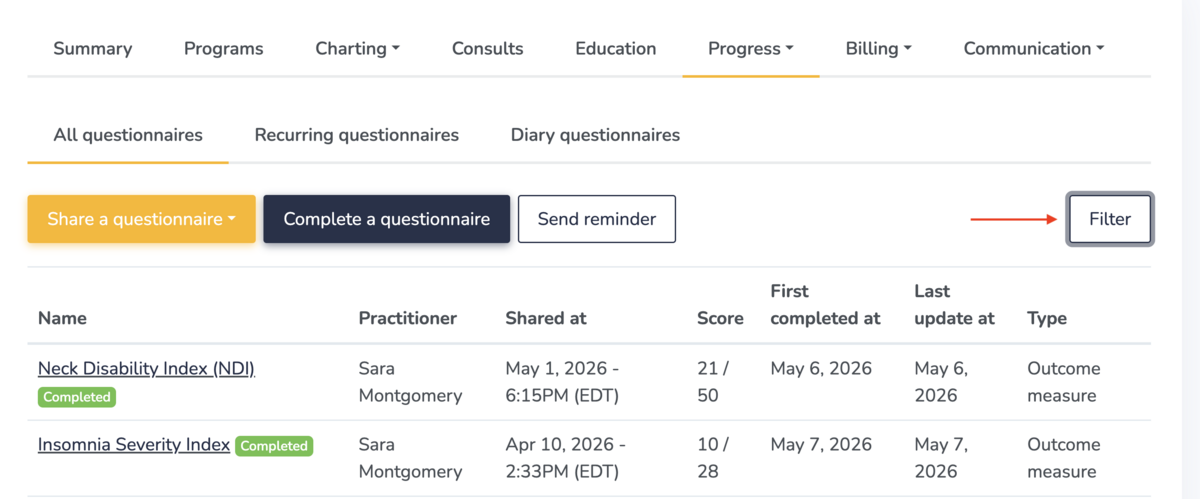
Here you will see all questionnaires that have been shared with this patient. Each questionnaire is marked as either Complete or Incomplete, giving you a quick overview of engagement at a glance.
To narrow the list, click Filter and select a specific questionnaire by name.
Viewing a completed questionnaire
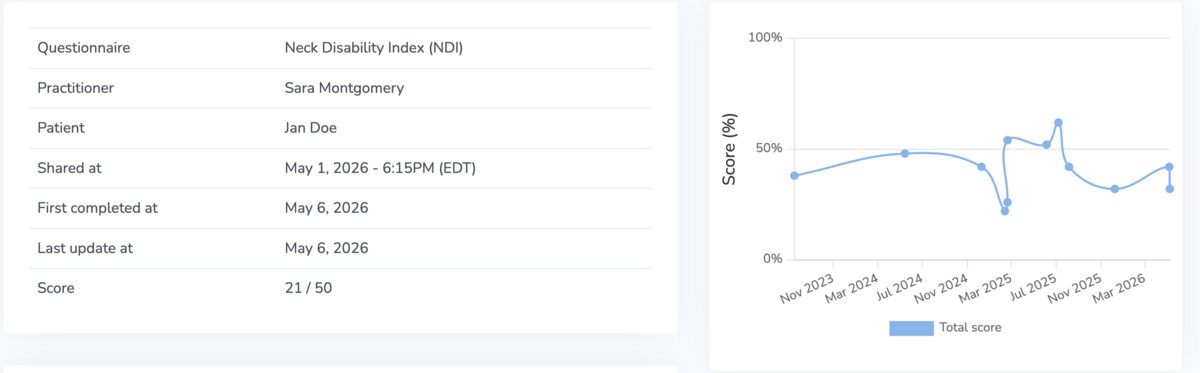
Click on any questionnaire to open it. For completed questionnaires, you will see:
- Date shared — when the questionnaire was sent to the patient
- Date completed — when the patient submitted their responses
- Date updated — if the questionnaire was subsequently modified
- Score — the patient's total score, if scoring is attached to the questionnaire
The score history chart displays the patient's scores over time. This is particularly useful for tracking outcomes across a course of treatment and identifying trends in patient-reported measures.
Individual question responses
Below the chart, the full questionnaire is displayed with the patient's answer to each question recorded alongside it. This allows you to review their specific responses in detail.